

Digital Showcase · Service 04
Scan the QR. The dish appears on your table.
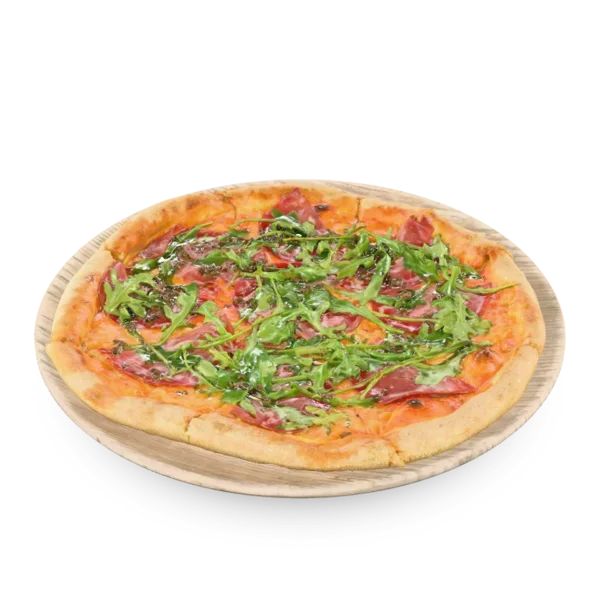
Guests scan a QR code, open the menu in their phone browser, spin the dish in 3D and tap "View in AR" to see the plate on their table at real size. No app to install. Allergens and ingredients are on the same screen.
- Works on iPhone and Android
- Allergen and ingredient info
- Each dish has its own QR
- Set up on site in Hatay
What you get
A menu that shows the food, not only describes it
A normal QR menu lists dishes. A 3D/AR menu lets the guest turn the dish, check its size and, on supported phones, place it on the table before ordering.
3D dish models
Showcase dishes are scanned and turned into light 3D models that open fast on a phone.
AR on the table
iPhones use AR Quick Look; ARCore-capable Android phones use Scene Viewer. On other phones the 3D view and photo still open.
A QR code per table or per dish
A table QR opens the whole menu. A printed menu can carry a small QR next to each dish.
Allergens, ingredients, prices
Information sits next to the dish. Prices change without reprinting, because the QR points to a short link you control.
How we work
From dishes to a live menu
Choose the dishes
We agree which 4-8 showcase dishes work in 3D. Glossy or liquid dishes (fish, ice cream, soup) are hard to scan; we say so up front and use photo or short video instead.
SizdenYour menu and the dishes to feature.Scan on site
Each dish is photographed from many angles while fresh and neat, outside service hours, and turned into a model.
SizdenAccess to the venue and the dishes.Test on phones
We test every model and QR code on at least one iPhone and one Android phone at the real table.
SizdenApprove names, prices, allergens and ingredients.Go live
The menu goes online, QR files are delivered print-ready, and you can update prices and dishes yourself or through us.
SizdenWhere the QR will be placed.
What we promise
What we promise, and what we do not
- Every QR code is scanned from the final print file and tested on real phones.
- The 3D model resembles the real plate but the served plate can differ slightly; the menu says "visual representation".
- Allergen and ingredient information is not published until the chef or owner approves it. This is not legal advice.
- AR needs an iPhone or an ARCore-capable Android phone; other phones still show the 3D view and photo.
Pricing
What the price depends on
- Number of dishes on the menu
- How many dishes are scanned into 3D
- Number of languages (Turkish, English, Arabic)
- Number of tables and branches
- Optional table ordering (payments go through your own licensed provider)
The first conversation is free. You are not obliged to accept the quote.
Related
Pair it with other services
FAQ
Questions you may have
What is a 3D/AR QR menu?
A digital menu opened by scanning a QR code. Guests can spin selected dishes in 3D and, on supported phones, see the plate on their table at real size with augmented reality (AR). Ingredients and allergens are on the same screen.
Do guests need to install an app?
No. The QR code opens the menu in the phone browser. No account or app is needed.
Which phones support AR?
iPhones use AR Quick Look. Android phones with ARCore use Scene Viewer. Phones without AR support still show the 3D view and the photo, so the menu always works.
What is the difference between a QR menu, a 3D menu and VR?
A QR menu shows photos, prices and ingredients after a scan. A 3D menu adds spinnable models of selected dishes, and AR shows them on the table. VR needs a headset; this service does not.
Does every dish need a 3D model?
No. We usually recommend 4-8 showcase dishes. The rest use photos and text. Glossy or liquid dishes are hard to scan, so we use photo or short video for them.
Can you work in Antakya, Iskenderun and the rest of Hatay?
Yes. Antakya360 is based in Antakya. We scan dishes and set up the menu on site in Antakya, Defne, Iskenderun, Arsuz, Samandag, Kirikhan, Dortyol and Reyhanli, and can travel to nearby provinces such as Gaziantep, Adana, Osmaniye, Kahramanmaras and Mersin.
Do I have to reprint the QR codes when prices change?
No. The printed QR opens a short redirect link that you control. Update the price or the dish and the printed codes stay the same.
Are the sample dishes real?
No, the sample menu is an example. Prices are based on Hatay and Adana menus checked in November 2026 and flagged as estimates when no source was found. Some 3D dishes in the demo come from third-party demo menus and free sources; your own menu contains only your dishes.
Will my menu show up in Google or AI search?
The menu is a normal web address that search engines and AI tools can read, and a menu link can be added to your Google Business Profile. We cannot guarantee rankings or AI answers; only the search engines decide that.
Scan it, and the dish appears on your table.
Türkçe sürüm: Türkçe. Open the sample menu and try it on your phone. The first conversation is free and the quote is written and clear.
Last updated: 10 November 2026